Every clinic on one screen
Zenda is where you work if you run the schedule for several doctors. Connect each client's WhatsApp Business account, answer every patient from a single list and know who is due back before the patient disappears.
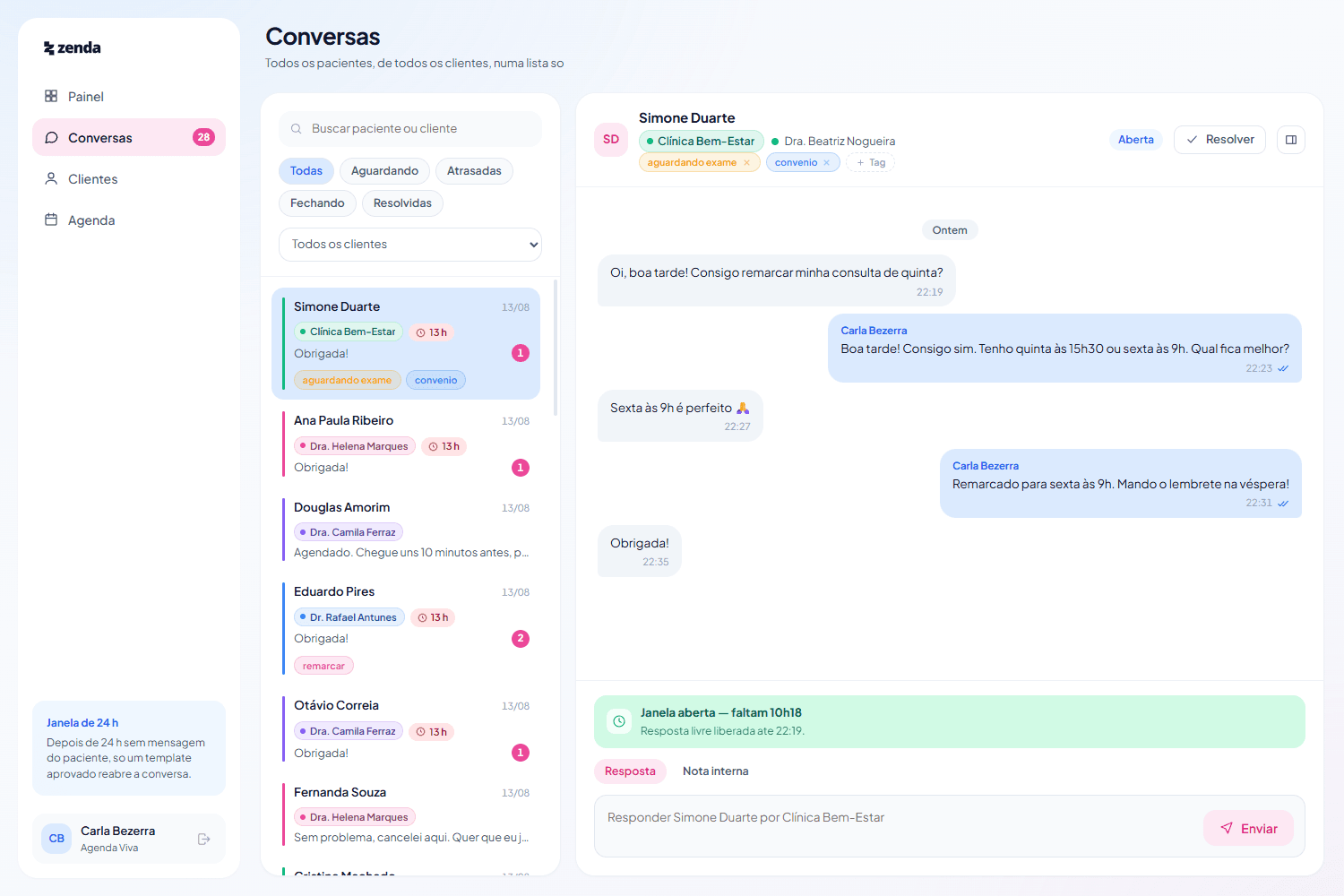
Five phones, no memory
Running the schedule for several doctors means several WhatsApp accounts, usually on different handsets. Worse than the switching is what never gets written down: the appointment agreed by message that never made it into any calendar. Every lost slot is revenue your client doesn't earn and work you can't bill for.
Four things, and all four on the same screen
- 01
Every patient in one list
Connect the WhatsApp Business account of each doctor or clinic you serve. Every conversation lands in the same queue, labelled with whose it is, because answering on behalf of the wrong doctor is the one mistake you cannot undo. Someone waiting three hours looks different from someone who just wrote.
- 02
A record that fills itself in
The patient is born from the conversation: a message arrives, the number becomes a record. You note what you learn (prefers mornings, comes with her daughter, latex allergy) and the history of visits and conversations sits alongside it. Records are per client: what you write for one doctor never shows on another's screen.
- 03
Each doctor's schedule
Days, hours, appointment length and more than one location, per client. You book from inside the conversation: filter by what the patient can do, pick the slot, confirm. A course of eight sessions becomes one series booked at once, with the clashes shown before you confirm.
- 04
Your clients, beside you
What you charge each doctor and when it falls due. Whether anyone's WhatsApp has dropped or is missing a payment method at Meta, the silent case where the number connects and doesn't send. And how many patients each one brought this month, which is the number that carries the conversation about your rate.
Not a mockup. The product running
The screens below come from Zenda in use, with demonstration data. No real patient appears here. The interface is in Brazilian Portuguese, because Zenda runs on WhatsApp in Brazil and that is who it is built for.
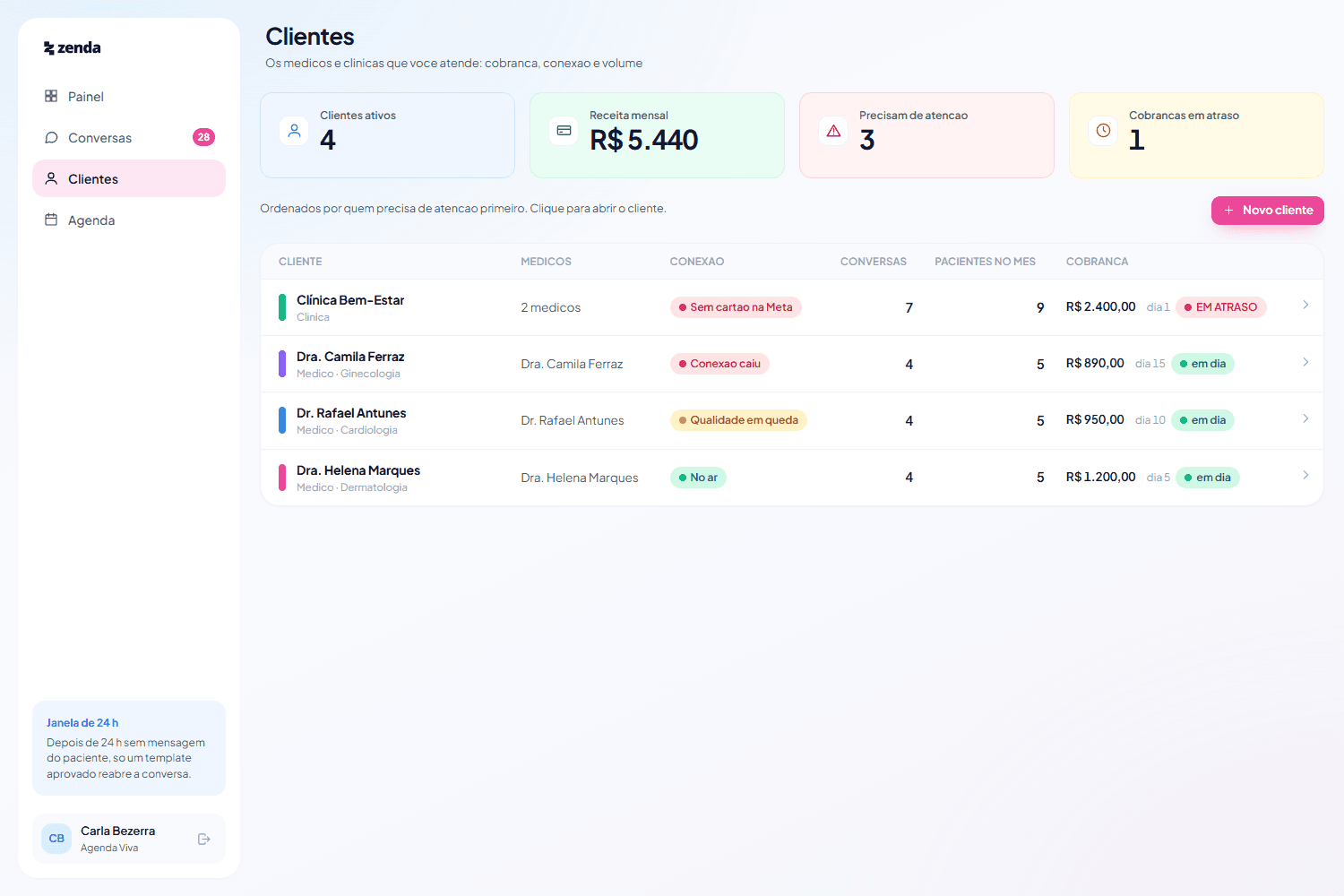
Your clients
Sorted by who needs attention first. Dr. Rafael is at the top because his Meta account has no card on file: the number connects and does not send, and it is the failure nobody notices until a patient stops replying. Beside it, how many patients each doctor brought in this month, which is the number that carries the conversation about raising your fee.
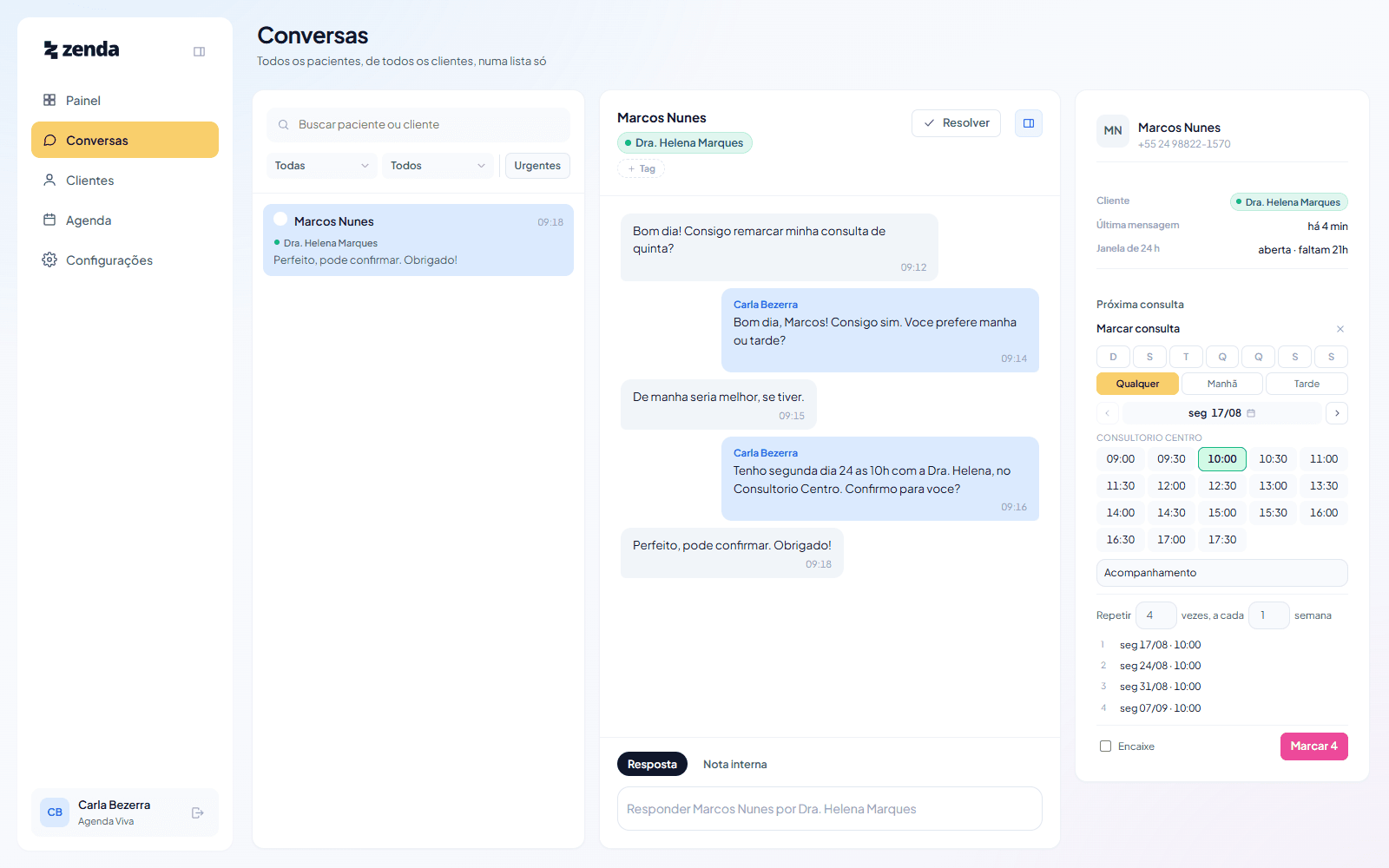
Book without leaving the chat
The patient asks to reschedule and the answer comes from the same screen. You filter by what she can do, weekday and time of day, read two slots out loud and confirm. For a course of treatment you book the whole series at once, and the taken dates show up before you confirm, not after.
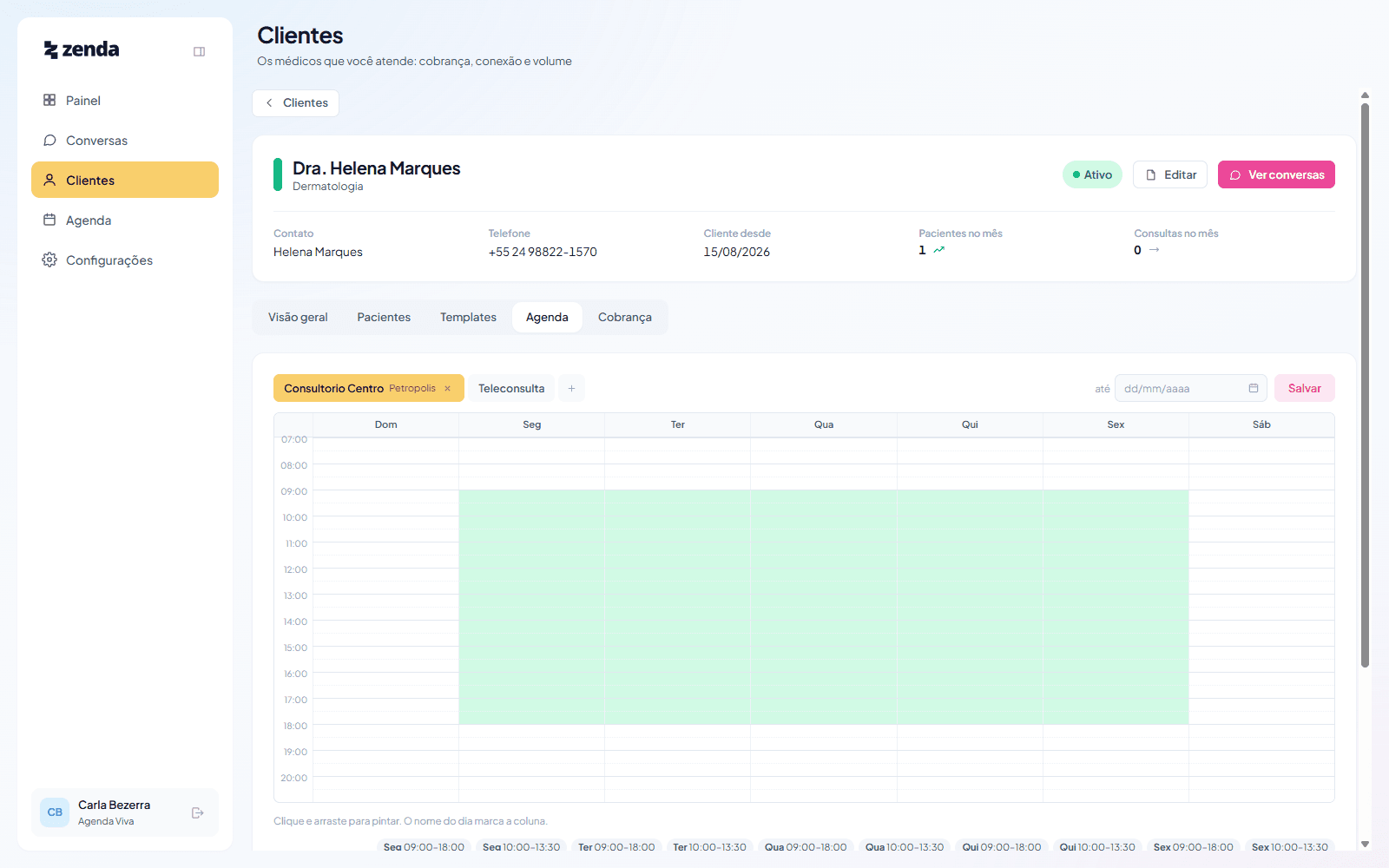
Each doctor's schedule
Every client has their own availability: days, hours, appointment length and more than one location. Holidays, time off and a Saturday clinic go in as an exception on a single date, without touching the routine that repeats.
The part that only makes sense in motion
These two blocks are not images. They are the product's own components, running here on the page.
Clique e arraste para pintar. O nome do dia marca a coluna.
Availability paints itself
Click and drag across the week. You can say the doctor sees patients Tuesday and Thursday mornings at one practice and Wednesday afternoons at another, with a different appointment length at each. A form with seven time fields would take all afternoon.
Marcar consulta
Consultório Centro
Repetir 1 vez, a cada 1 semana
- 1ter 18/08 · 10:00
The slot comes out of the conversation
She says she can only do mornings, Tuesday or Thursday. You tick both days, pick morning, and the list is already answering. Need to squeeze her into a full slot because the doctor made an exception? There is a box for that, and it adds her to the block instead of replacing whoever was already there.
How it works
- 01
Connect
The doctor authorises with their own Meta account, and the number stays theirs. Nothing changes for the patient: same number as always, and WhatsApp Business on the phone keeps working exactly as before. If they allow it, that number's earlier conversations come across too.
- 02
Handle
Every conversation in one list, tagged by client, with your own labels and a warning for anyone who has been waiting too long. The patient record opens beside it, with everything you already know.
- 03
Book
Each doctor's schedule lives in Zenda: days, hours, appointment length and locations. You book inside the conversation itself, write what it is about, and for a course of treatment you leave the whole series scheduled at once.
Questions
01Does it use the official WhatsApp Business API?
Yes, exclusively Meta's official Cloud API. Unofficial libraries are banned in our codebase, and not out of purism: they breach Meta's terms, and the risk is the doctor's number being banned, which is the practice's most critical asset. We connect through Coexistence: WhatsApp Business on their phone keeps working, the number doesn't change, and the patient notices nothing. If the doctor allows it at connection time, that number's earlier conversations come across too.
02Who pays Meta for the messages?
The owner of the number, doctor or clinic, under their own company. That's Meta's rule for our type of partnership, not our choice: the billing account belongs to whoever owns the number. Since July 2026 billing in Brazil is in reais, invoiced by Facebook Brasil. In practice it tends to be small, and the doctor can see their own spend whenever they want. If they'd rather not add a card, you can be an administrator on their account and use yours, folding the cost into your monthly fee. The number stays theirs, and they can remove you at any time.
03What happens to patient data?
It stays separated by client, not pooled. The record is per (client, patient) pair: the same person seen by two doctors has two records, and a note for one never appears on the other's screen. Each doctor is the controller of their own patients' data. Message bodies and clinical notes never reach logs, monitoring or error reports. We run no cross-client aggregation of health data, not even for internal metrics. And when you lose a client, that doctor's data goes with them: the data map lives in a public project document, with legal basis and retention period per table.
04How many clients can one person handle?
The product imposes no limit: there is one inbox, and filtering by client is for focus, not navigation. The real limit is Meta's messaging cap, which sits with each client's own account, so one client's volume never eats another's quota, and one client's reputation never drags down everyone else's delivery. We don't have a number from the beta yet, and we'd rather not invent one.
05Can I use it today?
We're in private beta with a small group of practices. Connecting new numbers depends on Meta approving our application, which is their process and not ours. Access goes out by list, and we run your first connection together, on a call. Request access and we'll tell you where the queue stands.
06Who makes Zenda?
Waterfall, the consultancy. Zenda came out of seeing the same problem in clinic after clinic: booking isn't the hard part; doing it across five WhatsApp accounts and remembering who was due back is.
Onboarding a small group of practices
Zenda is built for the people who run medical schedules. Connect the WhatsApp Business number of every clinic you look after, work all of those conversations from one screen, and keep the calendar and the appointment confirmations right beside the thread.